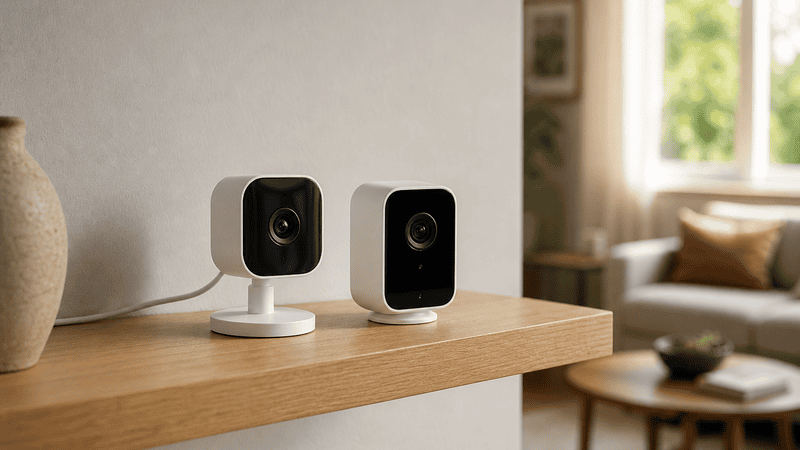
A wired nanny cam connects directly to a power source and recording device through physical cables, giving you a stable, continuous feed that doesn’t depend on your Wi-Fi network. A wireless nanny cam transmits video over Wi-Fi or a cellular signal, making installation faster and placement more flexible — but it relies on a strong, consistent internet connection to deliver reliable footage. Both work. Which one works best depends entirely on your setup, your priorities, and what you’re willing to manage.
That’s the bottom line. But if you’re about to put a camera in your home to watch over your child, “it depends” isn’t good enough. You need to know exactly what each system gives you, what each one costs you, and where each one fails — so you can make a decision you won’t second-guess the first time something goes wrong. Let’s get into it.
What does a wired nanny cam actually give you that wireless doesn’t?
Reliability. That’s the short answer. A wired camera doesn’t care whether your router is overloaded, whether your neighbor’s network is interfering with yours, or whether your ISP is having a rough Tuesday. It runs on a direct connection, and that connection doesn’t drop.
For parents who need continuous, uninterrupted coverage — especially in homes where someone relies on that footage for peace of mind throughout the day — wired is the gold standard. If a nanny cam is security infrastructure in your home, treat it like infrastructure. Wired systems don’t have to share bandwidth with your smart TV, your laptop, and every other device fighting for the same signal.
Wired setups also tend to deliver better video quality under demanding conditions. High-definition footage over a cable stays high-definition. The same footage pushed over a congested wireless network may compress, buffer, or drop frames at the exact moment you most need clarity.
The trade-off is installation. Running cables through walls requires planning, sometimes professional help, and a commitment to a fixed camera location. You’re not moving a wired camera from the living room to the nursery on a whim. If your home setup doesn’t support it, wired becomes more complicated than it’s worth.
What does a wireless nanny cam give you that wired can’t?
Flexibility and speed. A wireless camera goes where you need it, when you need it. No fishing cables through walls, no drilling, no committing to a permanent location before you’ve figured out the best angle. If the first spot you tried isn’t cutting it, you move the camera. Done.
For renters, or for parents who want a camera in place by tonight, wireless is the practical answer. Modern wireless nanny cams — including hidden camera options designed for first-time parents — can be up and streaming in under an hour. Many connect directly to your smartphone, letting you watch a live feed from anywhere you have cell service.
Wireless also opens up concealment options that wired cameras can’t match. A camera disguised as a smoke detector or a small household appliance is far more convincing when there’s no cable running from it to an outlet on the wall. If discretion matters to you, wireless wins on that front.
The trade-off is your network. A wireless camera is only as reliable as your Wi-Fi. In homes with dead zones, thick walls, or bandwidth-heavy households, that reliability takes a real hit. And when the signal drops — even briefly — so does your coverage.
Which type of nanny cam is harder to tamper with or disable?
Wired wins this one, and it’s not close. A wireless camera can be disrupted by jamming the Wi-Fi signal. A wired camera cannot be remotely disabled that way — it doesn’t use Wi-Fi. If someone in your home knows what they’re doing and wants to defeat a wireless camera, they have more options to do it without ever touching the device.
This isn’t a reason to panic. But it’s a reason to think seriously about your threat model. If your primary concern is monitoring a caregiver who doesn’t know a camera exists, a wireless camera in a well-disguised housing is completely appropriate. If your concern is more acute — if you’re documenting a situation and need footage that holds up — the tamper-resistance of a wired system matters.
For most households, this concern is secondary to placement and coverage. But you should factor it in, especially if you’ve chosen one of the most discreet hidden camera options available. A camera that can be rendered useless by killing the router is a vulnerability worth knowing about.
Does a wireless nanny cam need the internet to record?
Not always — but many do, and this is where a lot of buyers get surprised. Some wireless cameras stream footage live to a cloud server and require an active internet connection to record anything. If your internet goes down, the camera goes blind. That’s a design choice, not a flaw — but it matters to you if your connection isn’t rock solid.
The better wireless cameras include local storage — an SD card or a built-in memory module — so they continue recording even when the internet drops. If you’re buying a wireless camera, this feature is non-negotiable. You want a camera that keeps recording regardless of what your network is doing.
Some models combine both: they record locally and sync footage to the cloud when the connection is available. That’s the strongest configuration for a wireless setup. Know what you’re buying before you commit. Ask specifically whether the camera records to local storage during an outage. If the answer is no, keep looking.
How do wired and wireless nanny cams compare on video quality?
On paper, both can deliver excellent video quality. In practice, wired cameras consistently deliver that quality more reliably. The difference comes down to bandwidth and compression.
High-definition video generates a lot of data. A wired connection handles that data stream without having to compete for bandwidth or manage wireless interference. A wireless camera on a crowded network may automatically compress video, reduce frame rate, or introduce artifacts to stay connected — often without any visible indication that it’s doing so.
If you’re placing a camera in a room with strong, dedicated Wi-Fi and minimal interference, a wireless camera will likely give you excellent footage. If your network is typical — a mix of devices, varying signal strength, regular household traffic — a wired camera will outperform a wireless one on footage quality under real conditions.
Night vision performance, motion detection sensitivity, and wide-angle coverage are features you’ll find across both types. Focus on the camera’s sensor quality and lens specifications, not just the wired-versus-wireless distinction, when evaluating image quality.
What should I know about privacy and data security with wireless nanny cams?
This is the question most buyers don’t ask until after they’ve already set one up, and it deserves a direct answer. Wireless cameras that connect to the cloud transmit footage over the internet. That footage passes through servers operated by the manufacturer or a third-party service. It can be encrypted well, or it can be encrypted poorly. You don’t always know which.
A wired camera that records locally — to a DVR or NAS drive on your own network — keeps that footage entirely within your home. There’s no cloud server, no third-party storage, no external point of vulnerability. What you record stays where you put it.
That’s a real difference. If you’re recording inside your home, near your child, that footage is sensitive. Know where it’s going. If a wireless camera stores footage on the cloud, read the privacy policy. Know who has access, how long footage is retained, and what happens if the company changes its terms. These aren’t hypotheticals — they’re practical questions that deserve answers before you install the camera.
For parents who want the flexibility of wireless without the cloud exposure, a wireless camera with local SD card storage only is a strong middle ground. You get the installation ease of wireless without your footage leaving the house.
Frequently Asked Questions About Wired vs. Wireless Nanny Cams
Can a wireless nanny cam work without Wi-Fi?
Some wireless nanny cams can record to a local SD card without an active Wi-Fi connection, but live remote viewing requires internet access. Before purchasing, confirm whether the camera continues recording locally during a network outage. Cameras that depend entirely on cloud connectivity will stop recording if your internet drops — a significant gap in coverage.
Is a wired nanny cam more reliable than a wireless one?
Yes, in most real-world conditions. Wired cameras operate on a direct, stable connection that isn’t affected by Wi-Fi interference, network congestion, or internet outages. For households where consistent, uninterrupted coverage is the priority — especially when monitoring young children or vulnerable family members — a wired setup is the more dependable choice.
How hard is it to install a wired nanny cam?
Harder than wireless, but not impossible. Basic wired setups that plug into a power outlet and connect to a recording device can be set up in under an hour. More involved installations — running cables through walls for a clean, concealed look — may require professional help. If you’re not comfortable with basic wiring, factor in installation costs when comparing options.
Can someone jam or disable a wireless nanny cam?
Yes. Wireless cameras that rely on Wi-Fi can be disrupted by signal jamming or by disabling the router. This is a genuine vulnerability that wired cameras don’t share. For most households this risk is low, but if you’re documenting a specific situation or require footage that is tamper-resistant, a wired camera provides stronger protection against deliberate interference.
Where is the footage stored on a wireless nanny cam?
It depends on the camera. Some wireless cameras store footage on a cloud server managed by the manufacturer. Others record to a local SD card. Some do both. Cloud storage offers convenient remote access but means your footage travels outside your home network. Local storage keeps footage private but requires manual management. Know your camera’s storage method before you install it.
Will a wireless nanny cam slow down my internet?
A continuously streaming wireless camera does consume bandwidth. A single 1080p camera typically uses between 1–4 Mbps of upload bandwidth. In households with fast, modern internet connections, this is negligible. In households with slower speeds or many competing devices, it can degrade both camera performance and overall network speed. Test your bandwidth before committing to a multi-camera wireless setup.
Are hidden wireless nanny cams legal to use in my home?
In most U.S. states, recording video in common areas of your own home — living rooms, kitchens, entryways — is legal without notifying anyone. Recording audio is subject to stricter rules and varies by state. Recording in private spaces like bathrooms or bedrooms is illegal. Always verify your state’s specific laws before installing any hidden camera. This post provides general information, not legal advice.
Which is better for renters — wired or wireless nanny cams?
Wireless is almost always the better choice for renters. Wired installations often require drilling or routing cables through walls, which can violate lease terms and result in damage charges. Wireless cameras are non-invasive, portable, and removable without leaving a trace. For renters, wireless nanny cams offer the right balance of capability and flexibility without putting your security deposit at risk.
The choice between a wired and wireless nanny cam isn’t complicated once you know what each one actually delivers. Wired gives you stability, tamper-resistance, and footage that doesn’t depend on anything outside your walls. Wireless gives you speed, flexibility, and placement freedom. Know your priorities, know your network, and buy accordingly.
If you’re just getting started and want to understand the full picture before you buy, the complete guide to nanny cams for first-time parents covers the essentials without the noise. And if concealment is your priority, take a look at the most discreet hidden camera options — designed to stay invisible without sacrificing performance. Your home, your family, your call. Make it a confident one.